 AnyKlass
Fee system for tuition classes in Sri Lanka
Class fee management with a receipt for every payment.
Every student's monthly fee for every class, always up to date. See who has paid, who has part paid and who hasn't, even at the door as they walk in. Give a numbered receipt, and know the day's collection before you close.
- Free plan, no credit card
- Fees in rupees
- Keep your receipt books if you like
A month's fee
How fees work, from bill to receipt
Set the fee once on each class. AnyKlass makes every student's monthly bill and keeps the sums.
-
Each class has its fee
Theory, revision or paper class, each with its own monthly fee. A student in two classes pays for both.
-
The month is billed
Every month, or only for months the student comes to class. Pick the rule for the institute, and change it for one class if it is different.
-
The fee shows at the door
When a student checks in, any fee due is on the screen. Take it there, or hold them at the door.
-
Paid, with a receipt
Tick the months to pay, in full or in part, by cash, bank transfer, card or other. Print a numbered receipt, or write the number from your receipt book.
Everything in fees
Fee tracking that matches how tuition classes charge
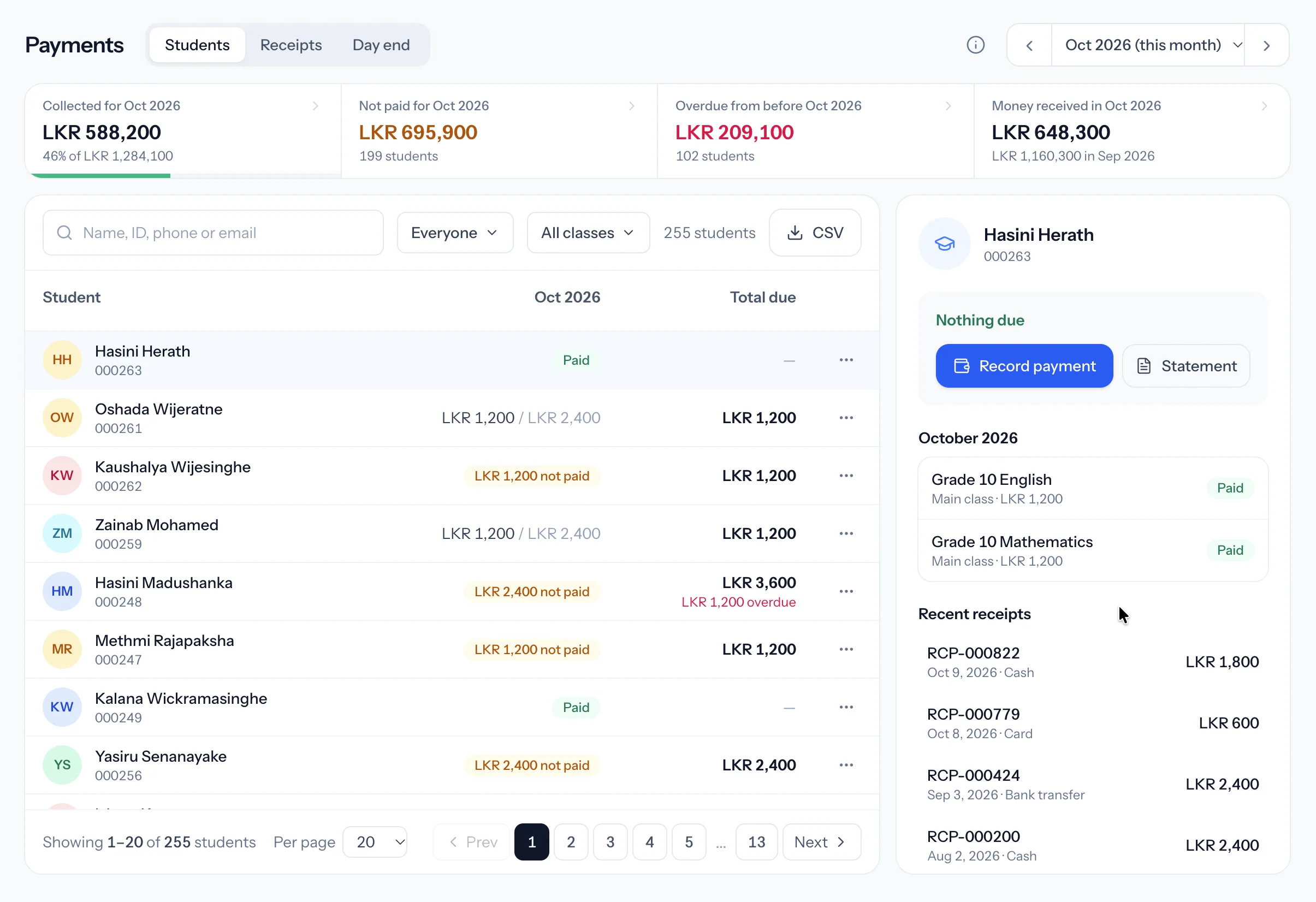
Each month reads Paid, Part paid, Not paid or Free, and months still owed from before read Overdue. No sums by hand.
Billing
- Every month, or only months attended
- A monthly fee on each class
- Bills made for you, month by month
Fees per student
- A student's own monthly fee, e.g. a sibling rate
- Lower one month's bill, with the reason kept
- Make a month free, e.g. a free card
Payments
- Several classes and months in one payment
- Part payments, with the balance kept
- Pay ahead for whole months
In the student's app
Fewer "Have I paid, sir?" questions
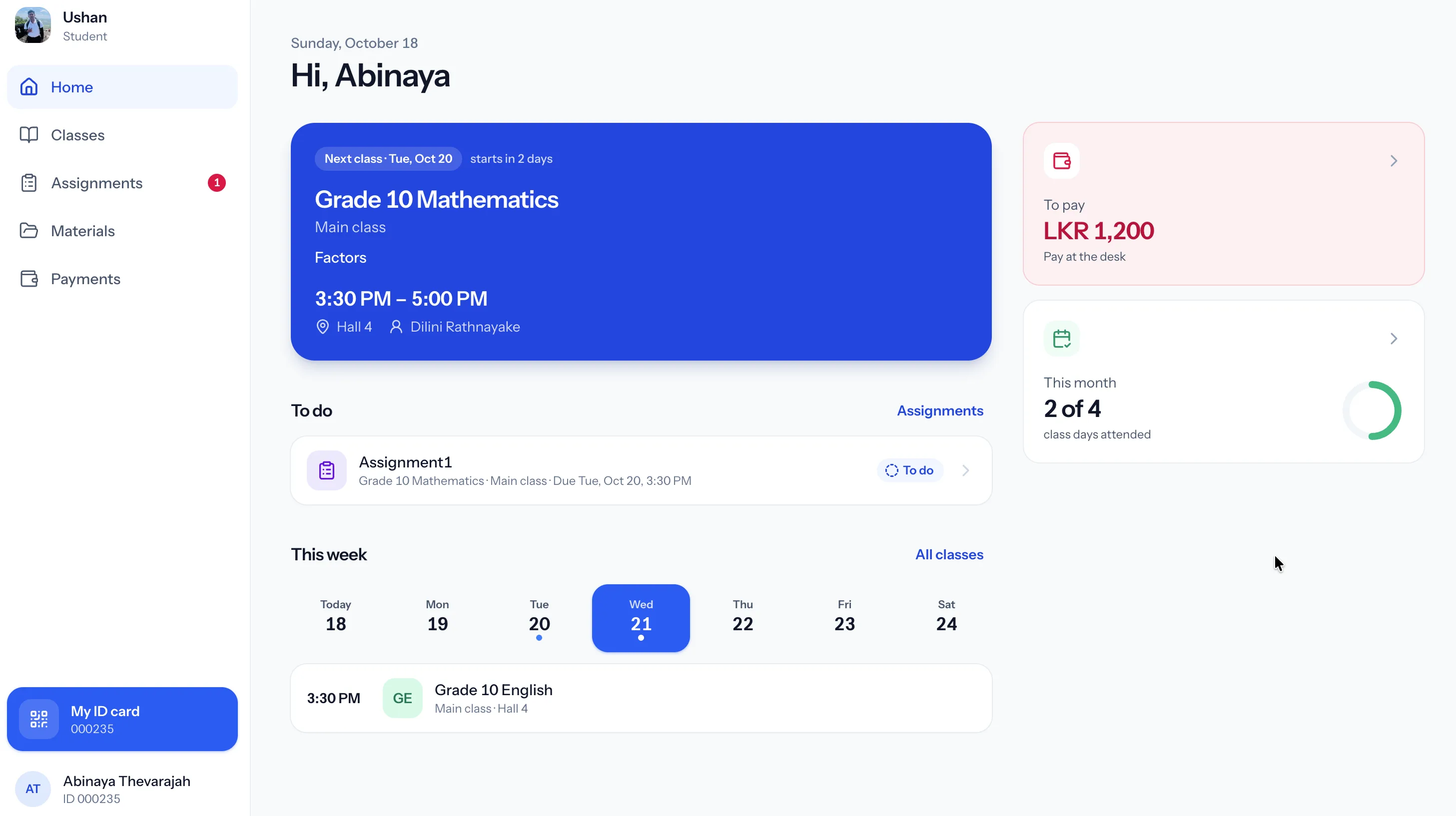
Every student sees their own fees on their phone, so they know what to bring before they reach the door.
- What there is to pay, class by class
- Every receipt, there the moment you record the payment
- Past bills, and "All paid" when nothing is due
Receipt book or AnyKlass
Stop flipping receipt books to find who hasn't paid
| The job | Receipt book + Excel | AnyKlass |
|---|---|---|
| Who hasn't paid this month | Checked page by page | One list, for a class or all |
| Student at the door with fees due | Nobody knows until month end | Shows on the scan; collect or hold |
| Part payments | A note in the margin | Part paid, with the balance due |
| The day's cash | Counted against the receipt book | Totals by method and staff member |
| A cancelled receipt | Torn out, no trace | Voided with its reason, kept |
We only charge students for the months they attend. Does that work?
Yes. Choose "only months attended", and a student is billed for a month once they come to a class that month. Or bill every month, whichever you do today. One class can follow a different rule from the rest.
Can we keep using our paper receipt books?
Yes. When you record a payment, type the number from your receipt book. Or leave it empty and AnyKlass numbers the receipt for you (RCP-000123), ready to print.
One student pays less than the class fee. Can we set that?
Yes. Give that student their own monthly fee for the class, or 0 to make the class free for them. To change just one month, lower that month's bill or make it free, with a reason others can read.
A student wants to pay for the next few months now.
Add the months ahead in the same payment, class by class, and they are on the receipt. Those months show as Paid when they come.
A student hasn't paid yet, but needs today's tute. Can they see it?
Yes. Give them access until a date, for one tute, one assignment, one class day or the whole month. When the date passes, access closes by itself. More on the online classroom.
Can we choose who takes payments and who sees the totals?
Yes. For teachers and the front desk, switch on what each may do: collect payments, see payment history and totals, void receipts, change fees and bills. Roles and permissions come with Starter and above.
This month's fees, without chasing a single one
Claim your institute's own web address, like your‑institute.anyklass.com. Free for up to 10 students, forever, with no card.