 AnyKlass
Online classroom for tuition classes in Sri Lanka
An LMS for tuition classes, in every student's pocket.
Every student gets their own app on the phone they already have: the day's tute and class recording under the class day they belong to, the Zoom link, and every assignment of their class in one list. Files are kept private, for your students only.
- Free plan, no credit card
- Students sign in with an ID, no email
- Nothing to install
The student app
Their whole class, on their own phone
No more scrolling a WhatsApp group for last week's link while the class waits.
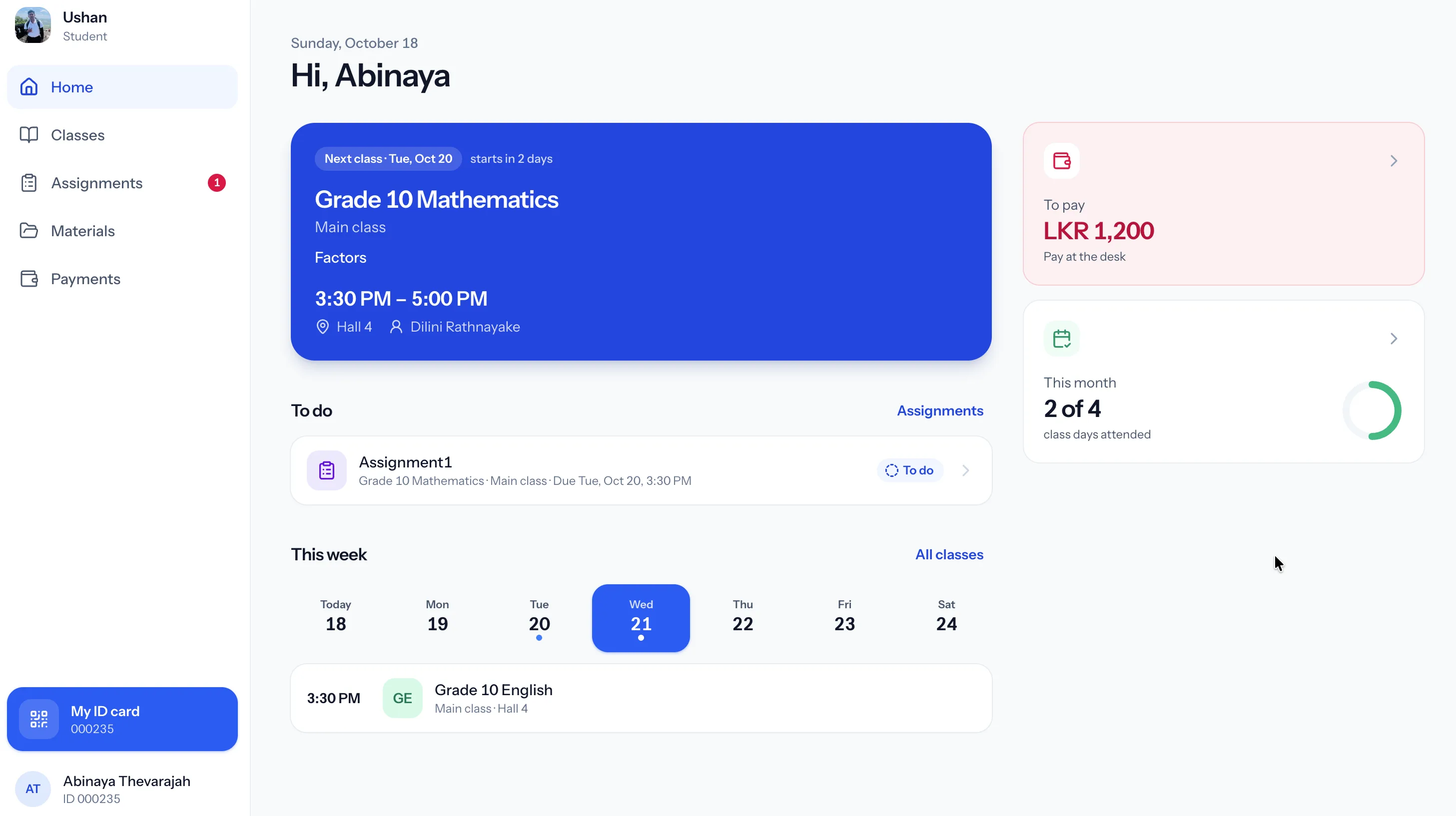
- Sign in with their student ID; no email needed
- Next class, with the hall or the Zoom link
- Every tute and recording, with new ones marked
- Assignments to submit, with their marks and the teacher's comment
- Their class's folders of past papers and notes
- Their fees, receipts, attendance and ID card
Everything in the online classroom
Tutes, recordings, online classes and assignments
Teachers add material to the class day it belongs to, or to the whole class, from a laptop or their phone. Students find it under that day.
Tutes and files
- PDF, Word, PowerPoint and Excel
- Photos and images; audio lessons
- Notes written straight into the class day
Class recordings
- Upload MP4, WebM or MOV video
- Opens and plays on the student's phone
- Or link a YouTube or Google Drive video
Online and hybrid classes
- Each class in the hall, online, or both
- Zoom, Google Meet and Microsoft Teams links
- The link sits beside the day's tute
Private by default
- Files in private storage, not on public links
- Only students of the class can open them
- Each opening gets a link that soon expires
Easy to find
- Each tute under the class day it belongs to
- Folders for each class: past papers, notes, links
- New items marked as new for the student
Assignments
- A question paper with a due date and time
- Students submit photos of their answers or a file
- Teachers mark online and add a marked paper
Assignments
Set a paper, collect the answers, mark them online
For answers submitted in the app, or on paper in class with only the marks entered.
-
Give the assignment
Add the question paper and the due date and time. Give it free to the whole class, or with a month's fee so it opens for those who paid. Mark it out of a total, with a grade, or as done. Take late answers marked Late, or stop them at the due time.
-
Students submit
They photograph each page with their phone, or upload a PDF, Word, PowerPoint or Excel file. Photos are sent full size, so every line can be read.
-
Mark one by one
Open each student's answers full screen, zoom in, type the mark and a comment, add a marked paper, and go to the next. Every class keeps a mark book you can download for Excel.
Who can open our tutes and recordings?
Only students of the class, signed in to their own app, once that month is paid or you open it for them. Files are kept in private storage and each opening gets its own link that expires soon after, so a link pasted in a group stops working.
A student hasn't paid this month yet, but needs today's tute. Can we?
Yes. Give them access until a date, say "Paying on Friday". Choose one tute, one assignment, one class day or the whole month, for one student or for everyone with fees due. When the date passes, access closes by itself.
Where do past papers and notes for the whole year go?
In the class's Files: folders you name and arrange, like on a computer. Drop in many files at once, or add a YouTube video or a Zoom recording as a link. Every student of the class opens them in their app, with new files marked.
Do we still use Zoom?
Yes, for the live class. AnyKlass keeps the Zoom, Google Meet or Microsoft Teams link in the class day, so students find it in their app beside the tute and, later, the recording.
Do students need a laptop or an app from the store?
No. Everything works in the browser of the phone they already have, Android or iPhone. They sign in with their student ID and a password, with no email address.
Can the teacher let a student submit again?
Yes. "Allow to submit again" opens it for that student, who can change their answers and submit them once more.
How much can we upload?
From 1 GB on the Free plan to 250 GB on Pro, with video uploads from Starter. See pricing.
Move your tutes out of WhatsApp this week
Claim your institute's own web address, like your‑institute.anyklass.com. Free for up to 10 students, forever, with no card.