 AnyKlass
Institute management system & LMS for tuition classes in Sri Lanka
Solutions for tuition institutes: attendance, fees and an LMS in one app.
AnyKlass runs the three jobs every tuition class does each week. Check students in at the door, collect monthly fees with a receipt, and give every student their tutes and recordings in their own app. All three share one student record, so nothing is typed twice.
- Free plan, no credit card
- Works on any phone browser
- Nothing to install
At the door
QR attendance system for tuition classes
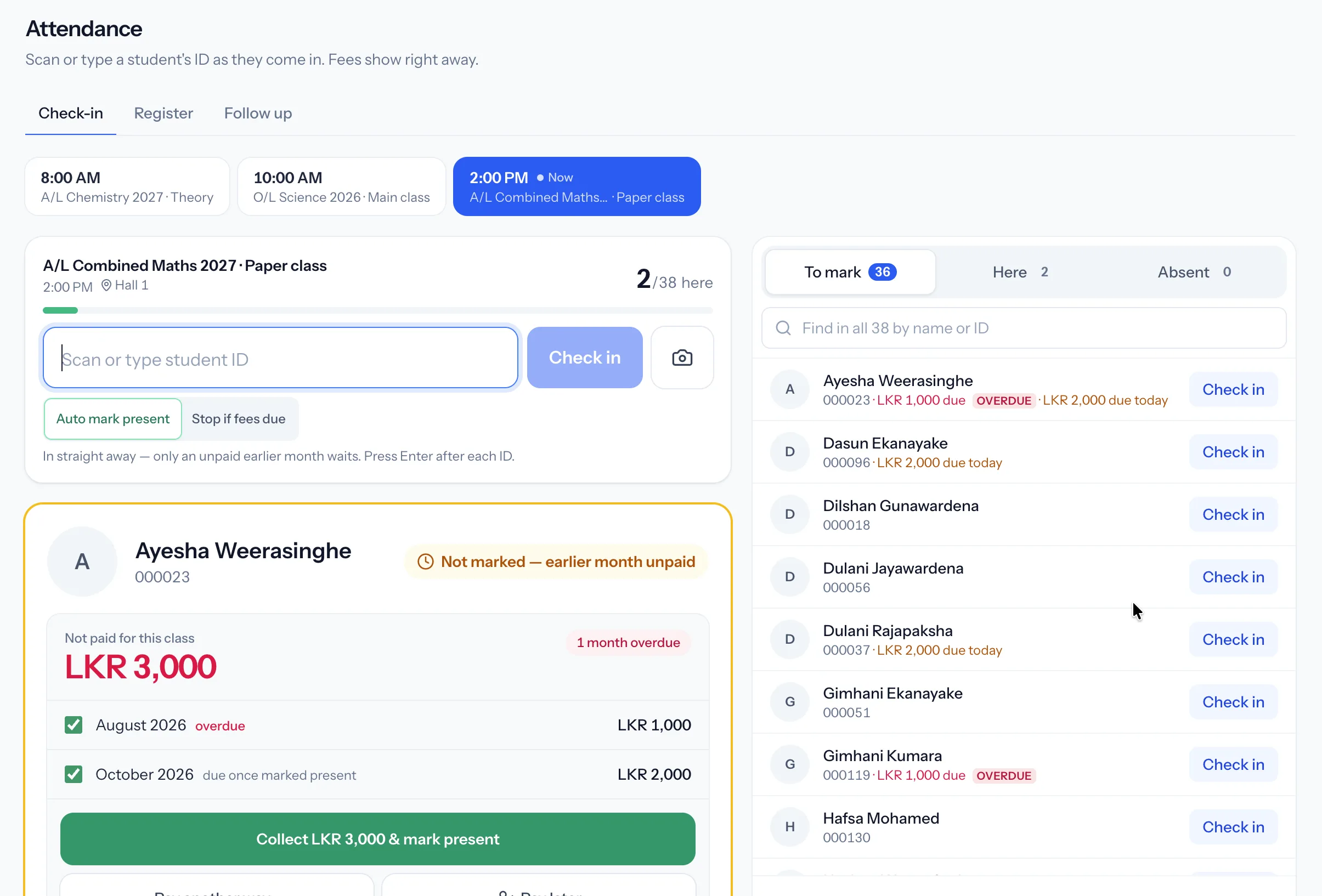
One scan as each student walks in. AnyKlass marks them present, or late once the class has started, fills the register and shows any fee due on the same screen.
- Scan the QR code on the student's app with a phone, laptop or USB scanner
- No card? Type their student ID or tap their name
- Present, late, absent and excused, with a monthly register to print or CSV
- A follow-up list of students who keep missing class, with parents' numbers
At the desk
Class fee management with a receipt for every payment
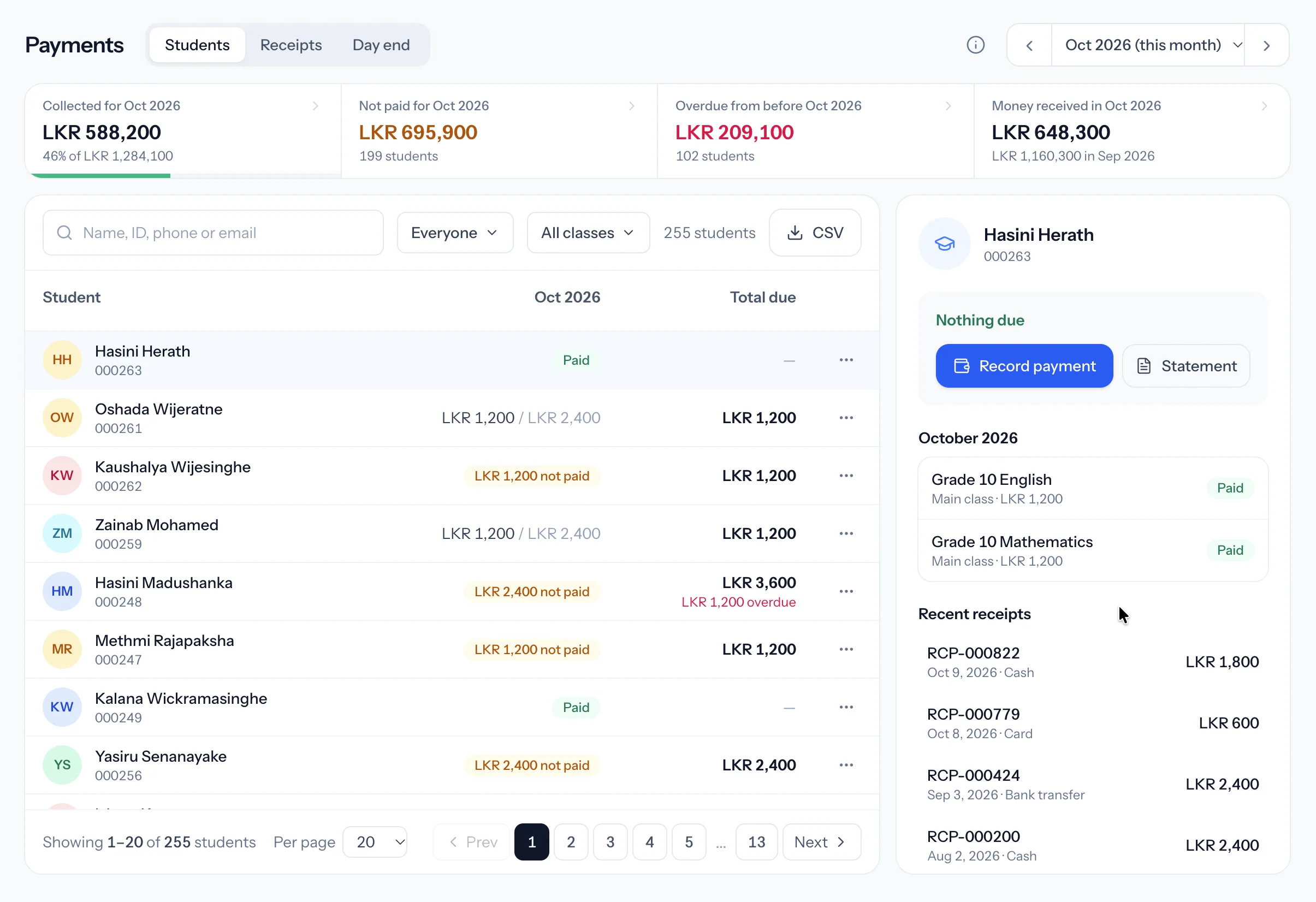
Every student's monthly fee for every class, always up to date. See who has paid, part paid or not paid, and know the day's collection before you close.
- Monthly bills made for you, every month or only for months attended
- A student's own fee for scholarships and siblings; part payments and paying ahead
- Cash, bank transfer or card, with numbered receipts or your receipt book's numbers
- The day's collection by payment method and by staff member
In the classroom
An LMS for tuition classes, in every student's pocket
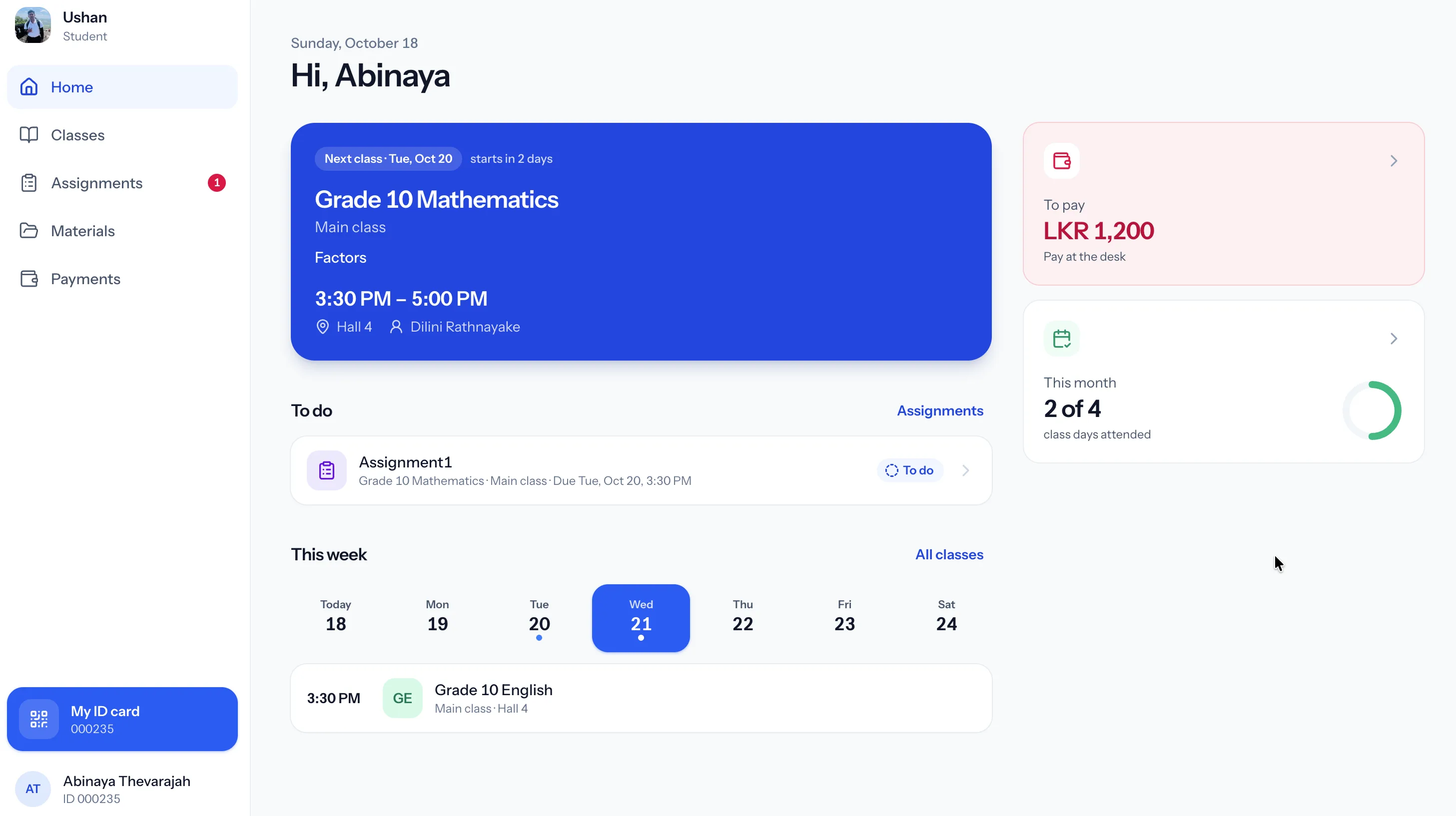
Every student gets their own app on the phone they already have: the day's tute, the class recording, the Zoom link and their assignments, kept private for your students.
- Tutes, past papers, audio and video under the class day they belong to
- Zoom, Google Meet and Microsoft Teams links for online and hybrid classes
- Material opens once that month is paid, on private links that expire
- Assignments answered from the phone and marked online, with a mark book per class
- Folders for each class: past papers, notes and YouTube or Zoom recording links
Who it's for
One app for owners, teachers, the front desk and students
Everyone signs in to your institute's own address and sees only their part of it.
Institute owners
- Today's collection by method and staff member, from home
- Every payment shows who took it; voided receipts keep their reason
- Several teachers and classes under one name and logo
Teachers and front desk
- Teachers see only the classes they teach
- Upload today's tute or recording from a phone
- The owner chooses what each role may do
Students
- Sign in with a student ID, no email needed
- Next class, tutes, recordings and links
- Their fees, receipts, attendance and ID card
Everything included
Everything a tuition institute runs on, in one app
No add-ons to buy. These come with AnyKlass; bigger plans add room for more students, staff and files, with QR scanning, video and roles from Starter.
Students
- Sign in with a student ID, no email needed
- Automatic IDs (000001) or your own format (A-1024, 2026/A/015)
- Guardian name and phone, school, NIC
- Printable sign-in slips; an ID card with a QR code in their app
Courses & timetable
- Courses by subject, grade and year
- Hall, online or hybrid classes
- Weekly timetable, extra classes, moved and cancelled days
- Holiday calendar that cancels every class that day
Check-in & attendance
- QR code, USB scanner, typed ID or name
- Present, late, absent and excused
- Hold students with fees due at the door
- Follow-up call list; monthly register to print or CSV
Fees & receipts
- Bill every month, or only months attended
- A student's own fee, part payments, a month made free
- Cash, bank transfer, card; numbered or receipt‑book receipts
- Daily collection by method and collector
Online classroom
- PDF, Word, PowerPoint, Excel and images
- Audio (MP3, WAV, M4A) and video (MP4, WebM, MOV)
- Zoom, Meet and Teams links, and notes
- Private links that expire; access until a date
Staff & security
- Owner, teacher, front-desk and student sign‑ins
- Teachers see only their own classes
- Switch each permission on or off per role
- Switch off a sign-in in one click when someone leaves
Is AnyKlass an LMS or an institute management system?
Both. The office side is an institute management system (IMS): check-in, attendance, fees, receipts and the timetable. The classroom side is an LMS: tutes, recordings, class links and assignments in each student's own app. They share one student record.
Can we use only attendance, or only fees?
Yes. Every part comes with every plan, and you use what you need. You can start with check-in and fees, and add class material when you are ready.
Does it work for online and hybrid classes?
Yes. Each class can be in the hall, online, or both. Add your Zoom, Google Meet or Microsoft Teams link, and students find it in their app beside the day's tute and recording.
Do we need to install anything?
No. AnyKlass works in the web browser on a computer, tablet or phone. Your institute gets its own address, like your-institute.anyklass.com, with your name and logo on the sign-in page.
How much does it cost?
Free for up to 10 students, forever. Paid plans start at LKR 999 a month for up to 30 students. See pricing for every plan.
Run attendance, fees and classes from one place
Claim your institute's own web address, like your‑institute.anyklass.com. Free for up to 10 students, forever, with no card.