 AnyKlass
Attendance system for tuition classes in Sri Lanka
QR attendance for tuition classes, with fees due shown at the door.
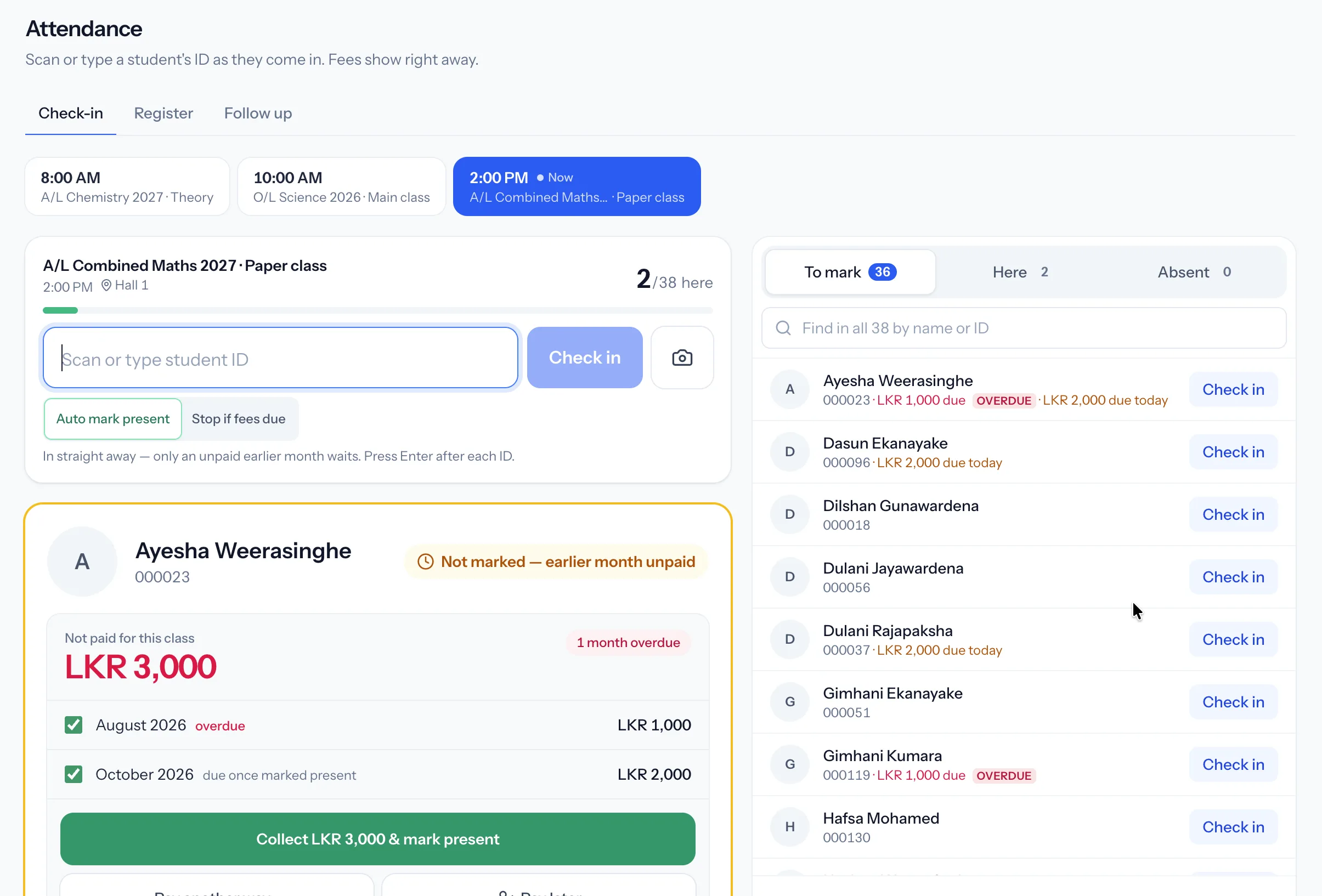
One scan as each student walks in. AnyKlass marks them present, or late once the class has started, fills the class register for you and shows any fee due on the same screen. No register book, no calling names, no counting ticks at month end.
- Free plan, no credit card
- Scan with a phone or laptop camera
- Nothing to install
At the door
How check-in works
A phone at the hall door is enough. The front desk or the teacher opens today's class, and students come through one by one. Two desks can scan the same class at once.
-
The student shows their ID card
Every student has an ID card with a QR code in their own app, on their phone. Cards you already print with a barcode of the student's ID scan too.
-
Scan, type or tap
Scan with the phone's or laptop's camera, or a USB barcode scanner. No card? Type their ID, or find them by name in the class list and tap.
-
Present, or late
Set once how many minutes after the start a student counts as late. The count of who is here updates with every scan.
-
Fees due, right there
If they owe for the class, the screen says how much. Take the payment and print the receipt without leaving the door.
Everything in attendance
An attendance system built for how tuition classes run
Theory on Saturday, an extra class on Wednesday, a day cancelled for a holiday: the register follows the timetable, so every class day has its own list.
Ways to check in
- QR code on the ID card in the student's app
- Barcodes on the cards you print today
- USB scanner, typed ID, or a tap on their name
The register
- Present, late, absent and excused
- Mark everyone still waiting absent in one go
- Teachers mark the classes they teach
Fees at the door
- What they owe for the class, on check-in
- Let them in, or stop anyone with fees due
- Collect and print the receipt there
Follow-up calls
- Students who missed their last 2 classes or more
- Students under 75% attendance
- Tap to call the student or their guardian
Monthly register
- A class's month on one sheet, day by day
- Each student's totals and attendance %
- Print it, or download it for Excel
Student IDs
- Automatic (000001) or your own (A-1024)
- The ID card stays bright on the phone at the desk
- The same ID signs the student in to their app
Paper register or QR
What changes when the register fills itself
| The job | Paper register | AnyKlass |
|---|---|---|
| Taking attendance | Calling names, ticking a book | One scan per student at the door |
| Late students | Noted when someone remembers | Marked late by the clock |
| Student with fees due | Nobody knows until month end | Shows on the scan; collect or hold |
| Student who stopped coming | Noticed weeks later | On the call list after 2 missed classes |
| Month-end totals | Counted by hand | Totals and % on the monthly register |
Do we need to buy a scanner?
No. The camera of any phone or laptop reads the QR code, in the browser: Android, iPhone, Windows or Mac. If you already have a USB barcode scanner, it works too.
We already give students printed ID cards. Can we keep them?
Yes. Give each student the same ID they have on the card (AnyKlass takes your own format, like A-1024 or 2026/A/015). If the card has a QR code or a barcode of that ID, it scans at the door.
A student forgot their phone and their card. What now?
Type their student ID, or search their name in the class list and tap it. They are checked in the same way, with any fee due shown.
Should a student with fees due get in?
You choose at the desk. "Auto mark present" lets everyone in and stops only a student with an earlier month unpaid. "Stop if fees due" holds anyone who owes, so you can collect first or let them in.
Can a teacher mark attendance inside the class instead?
Yes. Teachers see the classes they teach and mark each class day: present, late, absent or excused. Past class days that nobody marked are flagged on the timetable, so none are missed.
Which plan has QR check-in?
Check-in by ID or name, the register and the follow-up list come with every plan, Free included. Camera scanning and the QR code on the student's card come with Starter and above. See pricing.
Also in AnyKlass
Attendance is one part of the day
Run tomorrow's class without the register book
Claim your institute's own web address, like your‑institute.anyklass.com. Free for up to 10 students, forever, with no card.